 app4soft
234 lines
12 KiB
Markdown
234 lines
12 KiB
Markdown
# novelWriter
|
|
|
|
[/badge.svg?branch=main)](https://github.com/vkbo/novelWriter/actions)
|
|
[/badge.svg?branch=main)](https://github.com/vkbo/novelWriter/actions)
|
|
[/badge.svg?branch=main)](https://github.com/vkbo/novelWriter/actions)
|
|
[/badge.svg?branch=main)](https://github.com/vkbo/novelWriter/actions)
|
|
[/badge.svg?branch=main)](https://github.com/vkbo/novelWriter/actions)
|
|
[/badge.svg?branch=main)](https://github.com/vkbo/novelWriter/actions)
|
|
[](https://github.com/vkbo/novelWriter/actions)
|
|
[](https://codecov.io/gh/vkbo/novelWriter)
|
|
[](https://novelwriter.readthedocs.io/en/latest/?badge=latest)
|
|
[](https://github.com/vkbo/novelWriter/releases)
|
|
[](https://pypi.org/project/novelWriter)
|
|
[](https://pypi.org/project/novelWriter)
|
|
|
|
<img align="left" style="margin: 0 16px 4px 0;" src="https://raw.githubusercontent.com/vkbo/novelWriter/main/setup/icons/scaled/icon-novelwriter-96.png">
|
|
|
|
novelWriter is a Markdown-like text editor designed for writing novels assembled from many smaller
|
|
text documents. It uses a minimal formatting syntax inspired by Markdown, and adds a meta data
|
|
syntax for comments, synopsis, and cross-referencing between files. It's designed to be a simple
|
|
text editor that allows for easy organisation of text files and notes, built on plain text files
|
|
for robustness.
|
|
|
|
The plain text files are suitable for version control software, and also well suited for file
|
|
synchronisation tools. The core project structure is stored in a single project XML file. Other
|
|
meta data is primarily saved in JSON files.
|
|
|
|
The full documentation is available at
|
|
[novelwriter.readthedocs.io](https://novelwriter.readthedocs.io).
|
|
|
|
## Implementation
|
|
|
|
The application is written in Python 3 using Qt5 via PyQt5. It is developed on Linux, but it should
|
|
in principle work fine on other operating systems as well, as long as dependencies are met. The
|
|
unit tests are run on the latest versions of Ubuntu Linux, Windows Server and macOS.
|
|
|
|
## Project Contributions
|
|
|
|
Contributions to this project are welcome. However, please read the
|
|
[Contributing Guide](https://github.com/vkbo/novelWriter/blob/main/CONTRIBUTING.md) before
|
|
submitting larger additions ot changes to this project.
|
|
|
|
# Key Features
|
|
|
|
Some features of novelWriter are listed below. Consult the
|
|
[documentation](https://novelwriter.readthedocs.io) for more information.
|
|
|
|
### Markdown Flavour
|
|
|
|
novelWriter is _not_ a full-feature Markdown editor. It is a plain text editor that uses
|
|
Markdown-like syntax for adding a minimal set of formatting that is useful for the specific task
|
|
of writing novels. The formatting is currently limited to:
|
|
|
|
* Headings levels 1 to 4 using the `#` syntax only.
|
|
* Emphasised and strongly emphasised text. These are rendered as italicised and bold text.
|
|
* Strikethrough text.
|
|
* Hard line breaks using two or more spaces at the end of a line.
|
|
|
|
That is it. Features not supported in the editor are also not exported when using the export tool.
|
|
|
|
In addition, novelWriter adds the following, which is otherwise not supported by Markdown:
|
|
|
|
* A line starting with `%` is treated as a comment and not rendered on exports unless requested.
|
|
Comments do not count towards the word count. If the first word of the comment is `synopsis:`,
|
|
the comment is indexed and treated as the synopsis for the section of text under the same header.
|
|
These synopsis comments can be used to build an outline and exported to external documents.
|
|
* A set of meta data keyword/values starting with the character `@`. This is used for tagging
|
|
and inter-linking documents, and can also be included when generate a project outline.
|
|
* A variety of thin and non-breaking spaces are supported. Some of them depend on the system
|
|
running at least Qt 5.9. Earlier versions of Qt will unfortunately strip them out when saving.
|
|
* Tabs can be used in the text, and should be properly aligned in both editor and viewer. This can
|
|
be used to make simple tables and lists. Full Markdown tables and lists are not supported. Note
|
|
that for HTML exports, most browsers will treat a tab as a space, so it may not show up like
|
|
expected. If you import the HTML file to Libre Office, for instance, they should appear as
|
|
expected.
|
|
|
|
The core export format of novelWriter is HTML5. You can also export the entire project as a single
|
|
novelWriter Markdown-flavour document. These can later be imported again into novelWriter. In
|
|
addition, export to Open Document, PDF, and plain text is offered through the Qt library, although
|
|
with limitations to formatting.
|
|
|
|
The HTML format is well suited for file conversion tools and import into other text editors.
|
|
|
|
### Colour Themes
|
|
|
|
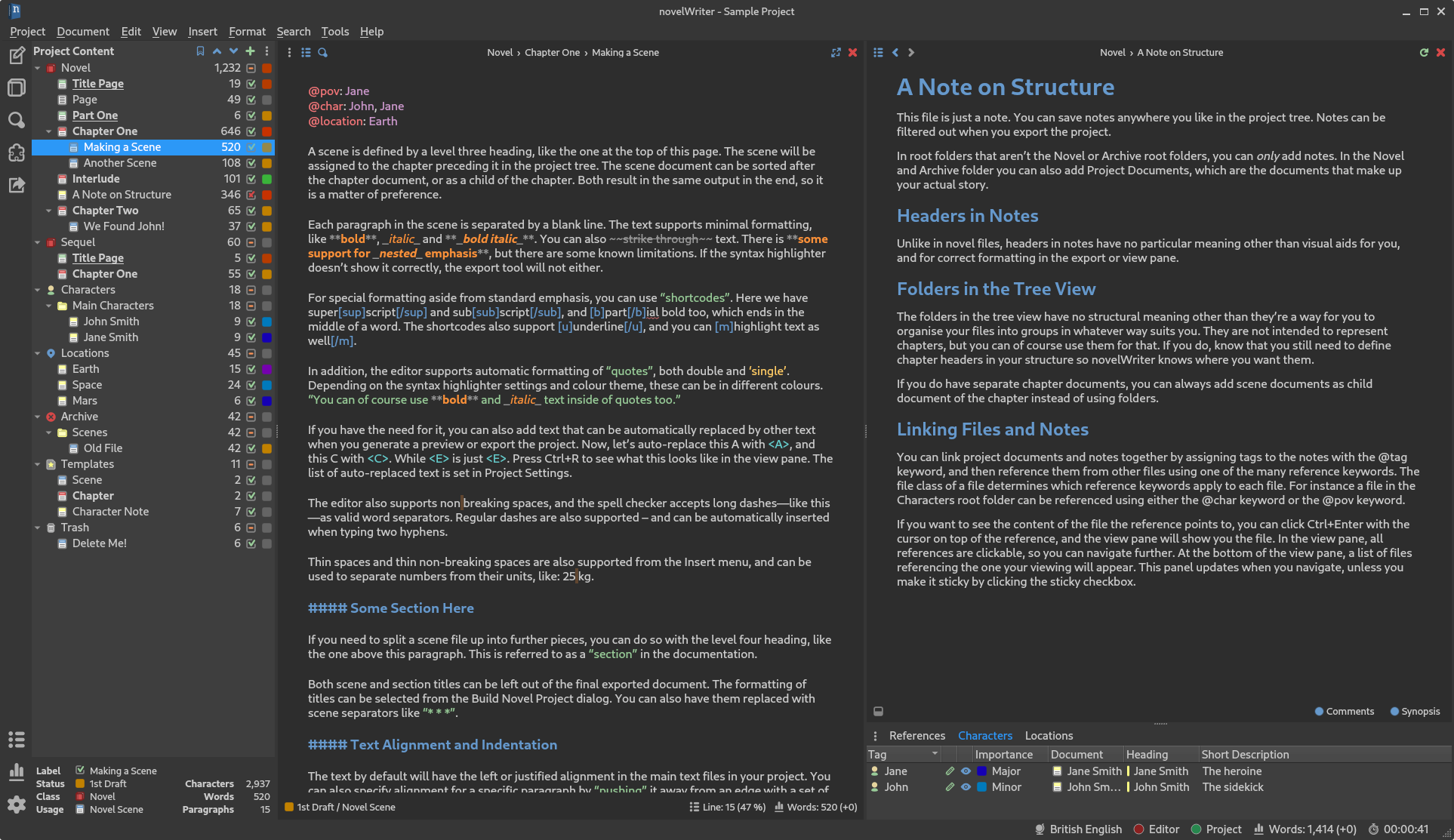
The editor has syntax highlighting for the features it supports, and includes a set of different
|
|
syntax highlighting themes. Optional GUI themes are also available, including dark themes.
|
|
|
|
|
|
### Easy Organising of Project Files
|
|
|
|
The structure of the project is shown on the left hand side of the main window. Project files are
|
|
organised into root folders, indicating what class of file they are. The most important root folder
|
|
is the `Novel` folder, which contains all of the files that make up the finished novel. Each root
|
|
folder can have subfolders. Subfolders have no impact on the final project structure, they are
|
|
there for you to organise your files in whatever way you want.
|
|
|
|
The editor supports four levels of headings, which determines what level the following text belongs
|
|
to. Headings of level one signify a book or partition title. Headings of level two signify the
|
|
start of a new chapter. Headings of level three signify the start of a new scene. Headings of level
|
|
four can be used internally in each scene to separate sections.
|
|
|
|
Each novel file can be assigned a layout format, which shows up as a flag next to the item in the
|
|
project tree. These are mostly to help the user track what they contain, but they also have some
|
|
impact on the format of the exported document. See the
|
|
[documentation](https://novelwriter.readthedocs.io) for further details.
|
|
|
|
### Project Notes
|
|
|
|
Supporting note files can be added for the story plot, characters, locations, story timeline, etc.
|
|
These have their separate root folders. These are optional files.
|
|
|
|
|
|
### Visualisation of Story Elements
|
|
|
|
The different notes can be assigned tags, which other files can refer back to using the `@` meta
|
|
keywords. This information can be used to display an outline of the story, showing where each scene
|
|
connects to the plot, and which characters, etc. occur in them. In addition, the tags themselves
|
|
are clickable in the document view pane, and control-clickable in the editor. They make it possible
|
|
to quickly navigate between the documents while editing.
|
|
|
|
# Installing and Running
|
|
|
|
For install instructions, please check the [Getting Started](https://novelwriter.readthedocs.io/en/latest/int_started.html) section in
|
|
the [documentation](https://novelwriter.readthedocs.io/).
|
|
|
|
## TLDR Instructions
|
|
|
|
If you want to run novelWriter directly from the source code, you must run the `novelWriter.py`
|
|
file from command line. For installations on Linux, macOS or Windows, see below.
|
|
|
|
**Note:** You may need to replace `python` with `python3` and `pip` with `pip3` in the instructions
|
|
below on some systems. You may also want to add the `--user` flag for `pip` to install in your user
|
|
space only.
|
|
|
|
### Install from PyPi
|
|
|
|
novelWriter is available on [pypi.org](https://pypi.org/project/novelWriter/), and can be installed
|
|
with:
|
|
```bash
|
|
pip install novelwriter
|
|
```
|
|
Dependencies should be installed automatically, but can also be installed directly with:
|
|
```bash
|
|
pip install pyqt5 lxml pyenchant
|
|
```
|
|
When installing via pip, novelWriter can be launched from command line with:
|
|
```bash
|
|
novelWriter
|
|
```
|
|
|
|
Make sure the install location for pip is in your PATH variable. This is not always the case by
|
|
default.
|
|
|
|
### Setup on Linux
|
|
|
|
If you're installing from source, the following commands will set up novelWriter on Linux:
|
|
```bash
|
|
pip install -r requirements.txt
|
|
python setup.py install
|
|
python setup.py xdg-install
|
|
```
|
|
|
|
This should make novelWriter available as a regular application on your system, with a launceher
|
|
icon, and file association with novelWriter project files.
|
|
|
|
### Setup on macOS
|
|
|
|
If you're installing from source, the following commands will set up novelWriter on macOS:
|
|
```bash
|
|
brew install enchant
|
|
pip3 install --user -r requirements.txt
|
|
pip3 install --user pyobjc
|
|
python3 setup.py install
|
|
```
|
|
|
|
At present, novelWriter isn't further integrated into the OS, so you must launch it from command
|
|
line with:
|
|
```bash
|
|
novelWriter
|
|
```
|
|
|
|
### Setup on Windows
|
|
|
|
For Windows, first ensure that you have Python installed. If not, get it from
|
|
[python.org/downloads](https://www.python.org/downloads/). Remember to select "Add Python to PATH"
|
|
during the installation, otherwise novelWriter cannot find it.
|
|
|
|
Then, download the `novelWriter-x.y.z-minimal.zip` file, where `x.y.z` is the version number, from
|
|
the [releases](https://github.com/vkbo/novelWriter/releases) page. You can extract it to wherever
|
|
you want to keep novelWriter on your PC, and run the `setup_windows.bat` file in it
|
|
(double-clicking it should work). This will install the necessary dependencies from
|
|
[pypi.org](https://pypi.org/) and create desktop and start menu icons.
|
|
|
|
## Debugging
|
|
|
|
If you need to debug novelWriter, you must run it from command line. It takes a few parameters,
|
|
which can be listed with the switch `--help`. The `--info`, `--debug` or `--verbose` flags are
|
|
particularly useful for increasing logging output for debugging.
|
|
|
|
# Licenses
|
|
|
|
This is Open Source software, and novelWriter is licensed under GPLv3. See the
|
|
[GNU General Public License website](https://www.gnu.org/licenses/gpl-3.0.en.html) for more
|
|
details, or consult the [LICENSE](https://github.com/vkbo/novelWriter/blob/main/LICENSE.md) file.
|
|
|
|
Bundled assets have the following licenses:
|
|
|
|
* The Typicons-based icon themes by Stephen Hutchings are licensed under
|
|
[CC BY-SA 4.0](http://creativecommons.org/licenses/by-sa/4.0/). The icons have been altered in
|
|
size and colour for use with novelWriter, and some additional icons added. The original icon set
|
|
is available at
|
|
[stephenhutchings/typicons.font](https://github.com/stephenhutchings/typicons.font).
|
|
* The Cantarell font by Dave Crossland is licensed under
|
|
[OPEN FONT LICENSE Version 1.1](http://scripts.sil.org/OFL).
|
|
It is available at [Google Fonts](https://fonts.google.com/specimen/Cantarell).
|
|
* The Tomorrow syntax themes use colour schemes taken from Chris Kempson's collection of code
|
|
editor themes, licensed with the
|
|
[MIT License](https://github.com/chriskempson/tomorrow-theme/blob/master/LICENSE.md),
|
|
and the main repo is available at
|
|
[chriskempson/tomorrow-theme](https://github.com/chriskempson/tomorrow-theme).
|
|
* Likewise, the Owl syntax themes use colours from Sarah Drasner's code editor themes, licensed
|
|
with the [MIT License](https://github.com/sdras/night-owl-vscode-theme/blob/master/LICENSE), and
|
|
the main repo is available at
|
|
[sdras/night-owl-vscode-theme](https://github.com/sdras/night-owl-vscode-theme).
|
|
|
|
# Screenshot
|
|
|
|
**novelWriter with default system theme:**
|
|

|
|
|
|
**novelWriter with dark theme:**
|
|
|