 Veronica Berglyd Olsen
194 lines
10 KiB
Markdown
194 lines
10 KiB
Markdown
# novelWriter
|
|
|
|
[](https://github.com/vkbo/novelWriter/actions/workflows/test_linux.yml)
|
|
[](https://github.com/vkbo/novelWriter/actions/workflows/test_win.yml)
|
|
[](https://github.com/vkbo/novelWriter/actions/workflows/test_mac.yml)
|
|
[](https://github.com/vkbo/novelWriter/actions)
|
|
[](https://codecov.io/gh/vkbo/novelWriter)
|
|
[](https://novelwriter.readthedocs.io/en/latest/?badge=latest)
|
|
[](https://github.com/vkbo/novelWriter/releases)
|
|
[](https://pypi.org/project/novelWriter)
|
|
[](https://pypi.org/project/novelWriter)
|
|
[](https://crowdin.com/project/novelwriter)
|
|
|
|
<img align="left" style="margin: 0 16px 4px 0;" src="https://raw.githubusercontent.com/vkbo/novelWriter/main/setup/novelwriter.png">
|
|
|
|
novelWriter is a plain text editor designed for writing novels assembled from many smaller text
|
|
documents. It uses a minimal formatting syntax inspired by Markdown, and adds a meta data syntax
|
|
for comments, synopsis, and cross-referencing. It's designed to be a simple text editor that allows
|
|
for easy organisation of text and notes, using human readable text files as storage for robustness.
|
|
|
|
The project storage is suitable for version control software, and also well suited for file
|
|
synchronisation tools. All text is saved as plain text files with a meta data header. The core
|
|
project structure is stored in a single project XML file. Other meta data is primarily saved as
|
|
JSON files.
|
|
|
|
The full documentation is available at
|
|
[novelwriter.readthedocs.io](https://novelwriter.readthedocs.io).
|
|
|
|
The full credits are listed in
|
|
[CREDITS.md](https://github.com/vkbo/novelWriter/blob/main/CREDITS.md).
|
|
|
|
You can also follow novelWriter on Mastodon at [fosstodon.org/@novelwriter](https://fosstodon.org/@novelwriter).
|
|
|
|
## Implementation
|
|
|
|
The application is written with Python 3 (3.7+) using Qt5 and PyQt5 (5.10+). It is developed on
|
|
Linux, but should in principle work fine on other operating systems as well as long as dependencies
|
|
are met. It is regularly tested on Debian and Ubuntu Linux, Windows, and macOS.
|
|
|
|
## Installation
|
|
|
|
### Linux Mint, Ubuntu and Debian
|
|
|
|
The Releases page has a `.deb` package that should install on Mint, Ubuntu and Debian.
|
|
|
|
You can also use the novelWriter [PPA](https://launchpad.net/~vkbo/+archive/ubuntu/novelwriter).
|
|
For more details, check the [Getting Started](https://novelwriter.readthedocs.io/en/latest/int_started.html)
|
|
section in the documentation.
|
|
|
|
### Windows 10+
|
|
|
|
The Release page has a `setup.exe` file for Windows 10, that should also work on other Windows
|
|
versions. The installer includes Python 3.10 and the library dependencies.
|
|
|
|
### Other Install Options
|
|
|
|
You can also download and install one of the minimal zip files from the
|
|
[Releases](https://github.com/vkbo/novelWriter/releases) page or the
|
|
[novelwriter.io](https://novelwriter.io/) website.
|
|
The [Getting Started](https://novelwriter.readthedocs.io/en/latest/int_started.html) section of the
|
|
documentation has detailed install instructions for these packages, and for installation via the
|
|
Python Package Index.
|
|
|
|
## Project Contributions
|
|
|
|
Please don't make feature pull requests without first having discussed them with the maintainer.
|
|
You can make a feature request in the issue tracker, or if the idea isn't fully formed, start a
|
|
discussion on the discussion page. Please also don't make pull requests to reformat or rewrite
|
|
existing code unless there is a very good reason for doing so.
|
|
|
|
Fixes and patches are welcome. Contributions related to packaging and installing novelWriter will
|
|
also be appreciated, but please make an issue or a discussion topic first. Before contributing any
|
|
code, please also read the full
|
|
[Contributing Guide](https://github.com/vkbo/novelWriter/blob/main/CONTRIBUTING.md).
|
|
|
|
### Translations
|
|
|
|
New translations are always welcome. This project uses Crowdin to maintain translations, and you
|
|
can contribute translations at the [Crowdin project page](https://crowdin.com/project/novelwriter).
|
|
If you have any questions, feel free to post them to the
|
|
[Translations of novelWriter](https://github.com/vkbo/novelWriter/issues/93) issue thread.
|
|
|
|
For more details, and how to use Qt Linguist for translations, see the
|
|
[i18n instructions](https://github.com/vkbo/novelWriter/blob/main/i18n/README.md).
|
|
|
|
## Key Features
|
|
|
|
Some key features of novelWriter are listed below. The
|
|
[documentation](https://novelwriter.readthedocs.io) has a lot more information.
|
|
|
|
### Formatting Codes
|
|
|
|
Although novelWriter is a plain text editor, it uses a Markdown-like syntax to allow for a minimal
|
|
set of formatting that is useful for the specific task of writing novels.
|
|
|
|
| Code | Usage | Description |
|
|
|------------|----------|-------------|
|
|
| `#` | Prefix | Headings level 1 to 4. |
|
|
| `_` | Wrapped | Emphasised (italicised) text. |
|
|
| `**` | Wrapped | Strongly emphasised (bold) text. |
|
|
| `~~` | Wrapped | Strikethrough text. |
|
|
| `%` | Prefix | A comment; does not count towards the word count.<sup>1</sup> |
|
|
| `@` | Prefix | The following text is parsed as a keyword/value command for meta data. |
|
|
| `>` | Prefix | The paragraph is indented one tab width from the left. |
|
|
| `<` | Suffix | The paragraph is indented one tab width from the right. |
|
|
| `>>` | Prefix | The paragraph is right-aligned. |
|
|
| `<<` | Suffix | The paragraph is left-aligned. |
|
|
| `>>`, `<<` | Wrapped | The paragraph is centred. |
|
|
|
|
<sup>1</sup> If the first word of the comment is `synopsis:`, the comment is indexed and treated as
|
|
the synopsis for the section of text where it occurs. These synopsis comments can be used to build
|
|
an outline and exported to external documents.
|
|
|
|
### Export Formats
|
|
|
|
The core export formats of novelWriter are Open Document and HTML5. Open Document is an open
|
|
standard for office type documents that is supported by most office applications. See
|
|
[Open Document > Application Support](https://en.wikipedia.org/wiki/OpenDocument#Application_support)
|
|
for more details.
|
|
|
|
You can also export the entire project as a single novelWriter-markup document. These can later be
|
|
imported again into novelWriter. In addition, printing and export to PDF is offered through the Qt
|
|
library, although with limitations to formatting.
|
|
|
|
### Colour Themes
|
|
|
|
The editor has syntax highlighting for the features it supports, and includes a set of different
|
|
syntax highlighting themes. Optional GUI themes are also available, including dark themes.
|
|
|
|
### Easy Organising of Project Files
|
|
|
|
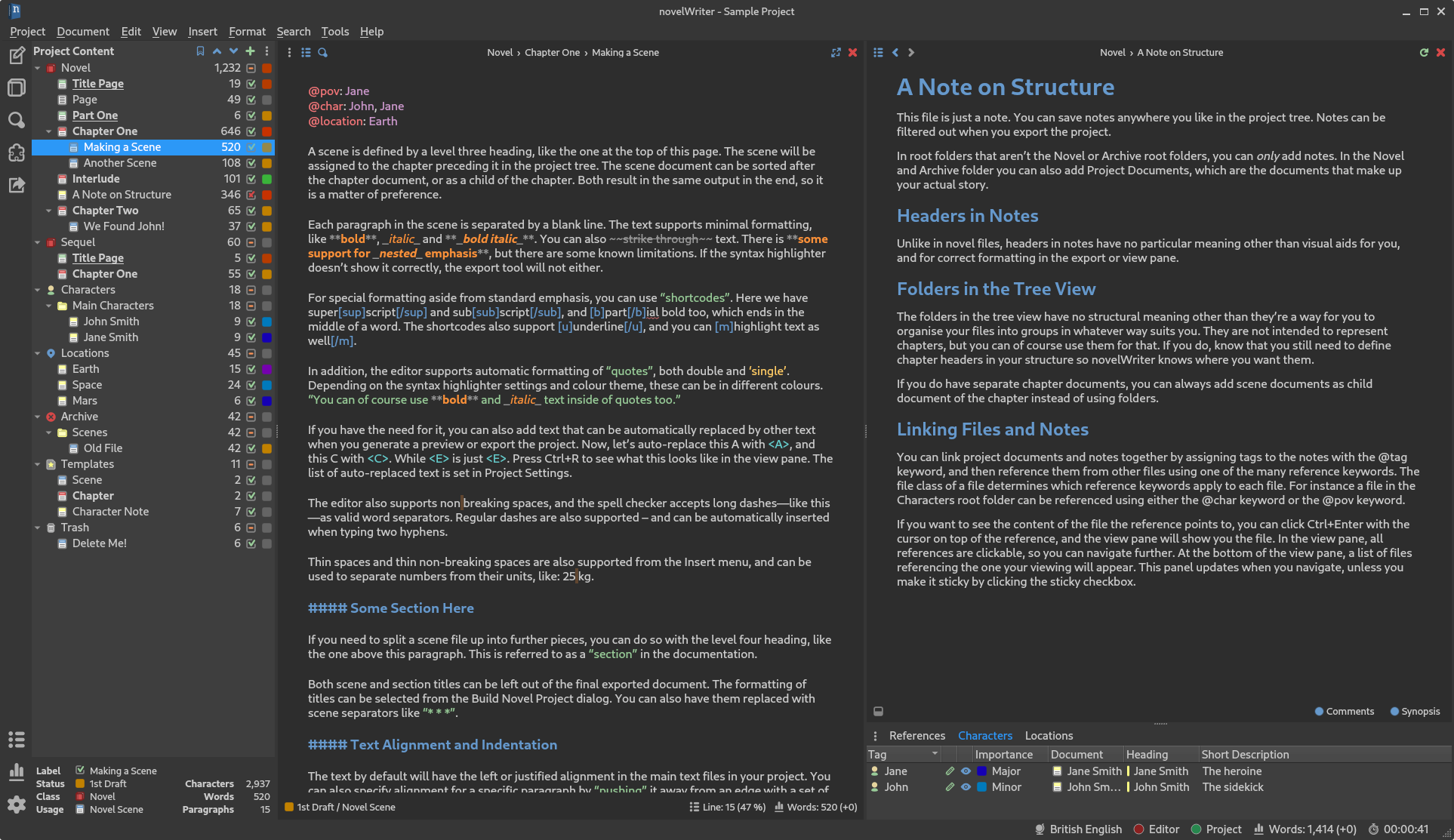
The structure of the project is shown on the left hand side of the main window. Project files are
|
|
organised into root folders, indicating what class of file they are. The most important root folder
|
|
is the `Novel` folder, which contains all of the files that make up the novel itself. Each root
|
|
folder can have subfolders. Subfolders have no impact on the final project structure, they are
|
|
there for you to organise your files in whatever way you want.
|
|
|
|
The editor supports four levels of headings, which determine what level the following text belongs
|
|
to. Headings of level one signify a book or partition title. Headings of level two signify the
|
|
start of a new chapter. Headings of level three signify the start of a new scene. Headings of level
|
|
four can be used internally in each scene to create separate sections.
|
|
|
|
See the [documentation](https://novelwriter.readthedocs.io) for further details.
|
|
|
|
### Project Notes
|
|
|
|
Supporting notes can be added for the story plot, characters, locations, story timeline, etc. These
|
|
have their separate root folders and are optional to use.
|
|
|
|
### Visualisation of Story Elements
|
|
|
|
The different notes can be assigned tags, which other files can refer back to using `@`-prefixed
|
|
meta keywords. This information can be used to display an outline of the story, showing where each
|
|
scene connects to the plot, and which characters, etc. occur in them. In addition, the tags
|
|
themselves are clickable in the document view pane, and control-clickable in the editor. They make
|
|
it possible to quickly navigate between the documents while writing.
|
|
|
|
## Installing or Running from Source
|
|
|
|
If you want to run novelWriter directly from the source code, you must run the `novelWriter.py`
|
|
file from command line.
|
|
|
|
Dependencies can generally be installed from PyPi with:
|
|
```bash
|
|
pip install -r requirements.txt
|
|
```
|
|
|
|
On Linux, the dependencies are generally available in the standard package repository.
|
|
|
|
For more details on running or installing from source, see the
|
|
[documentation](https://novelwriter.readthedocs.io).
|
|
|
|
## Debugging
|
|
|
|
If you need to debug novelWriter, you can run it from the command line and increase terminal output
|
|
by adding the `--info` or `--debug` flags. By default, only warnings and errors are printed.
|
|
|
|
## Licence
|
|
|
|
This is Open Source software, and novelWriter is licenced under GPLv3. See the
|
|
[GNU General Public License website](https://www.gnu.org/licenses/gpl-3.0.en.html) for more
|
|
details, or consult the [LICENSE](https://github.com/vkbo/novelWriter/blob/main/LICENSE.md) file.
|
|
|
|
Bundled assets and their licences are listed in
|
|
[CREDITS](https://github.com/vkbo/novelWriter/blob/main/CREDITS.md).
|
|
|
|
## Screenshots
|
|
|
|
**novelWriter with default system theme:**
|
|

|
|
|
|
**novelWriter with dark theme:**
|
|
|